


Give your generosity even more power by donating your tax back to Save the Children.
Every year, thousands of Kiwis miss out on claiming the tax credit they are entitled to for charitable donations. If you’re eligible to claim a donation tax credit from Inland Revenue, you could receive around 33% of your charitable donations back.
By donating that tax refund to Save the Children, you can help make sure more children have the safe, healthy childhood they deserve. By donating your tax credit, you help ensure children can survive, be protected, learn, and be heard, here in Aotearoa and around the world.
How donating your tax credit works
You can claim your donation tax credit online using your donation receipt/s. This can be uploaded as a PDF, a photo, or a scanned copy of the original receipt.
To get started, you’ll need either a myIR account or a RealMe login, along with your IRD number. If you’re setting up an account for the first time, make sure you select the option that allows you to receive donation tax credits.
We’ve created a simple step‑by‑step guide to walk you through the process and make it as easy as possible.
Donate here.
Sign in to your myIR account using either your myIR or RealMe login.
Once logged in, you’ll land on your Home / Summary page.
On the home screen, look for Donation tax credit and select Enter donation tax credit receipts.
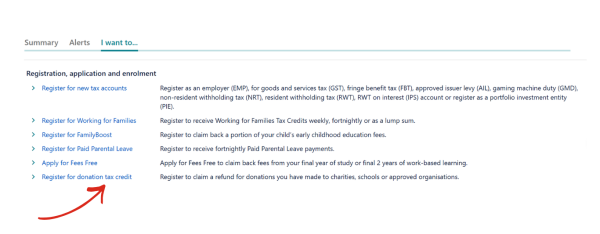
If you don’t see this option, you can add it by selecting “I want to…”, then choosing Register for donation tax credit and completing the short registration.
Select Add a receipt and enter the required information from your Save the Children donation receipt, including:
- Organisation name: Save the Children New Zealand
- Donation type: Other (for Save the children)
- Receipt date (as shown on your receipt)
- Donation amount
Attach a copy of your donation receipt by selecting Add receipt attachment.
- You can upload a PDF, scanned copy, or a clear photo of your receipt.
- Add a short description such as “Donation receipt 2025/26”.
Once everything is uploaded, select OK, then Next.
You’ll be shown a summary of the details you’ve entered. Take a moment to check that everything looks correct, then select Submit to send your claim to IRD.
Many supporters choose to receive their tax credit refund directly and then donate it back to Save the Children. This helps ensure your gift can be put to work quickly where children need it most.
If you prefer to do this, select No when asked about transferring the credit, submit your claim, and once your refund is received, you can make a new donation via our website or to our bank account
Account Name:
Acount Number:
Reference:
Code: